I hope you like my first CU Freebie. I hope to have some time to get somemore halloween stuff done, check back :)
Enjoy
RETIRED
4Shared
Oct 26, 2008
CU Freebie
Pumpkin Wreath
I love fall colors when they have started to turn on the trees. It inspired this wreath after watching some of the leaves turning. This year is close to an end as we are heading into a new year. Hopefully it will be full of proserity and filled with much better things then this past year has given us.
Ok ... on with your freebie :)

RETIRED
Oct 21, 2008
New Blog Awards!!
I'd like to thank these awesome ladies for awarding me the following awards. There are so many and you all hit me while I couldn't get online to take care of them :o
But, I am getting to them now, lol. Thank you so much for considering me!
I haven't had the time to search for other blogs to send these along to since I have still been getting my computer back in order ... but ... I just can't not comment with my thanks and the links to all the awesome ladies's blogs who were thinking of me when awarding them to me. Thank you all!
OK ... on to the awards ...
I Love Your Blog Award
Thanks Tammy for the award. Please visit her site at MissFoxysDesigns
Gold Star Award
Thanks for this awesome award Pat(PCArt)! You can vist Pat's site at PCArtistique
Never Ending Energy Blog Award
Steph, my good frined and all around sweetheart! Thank you so much for this award. You can visit Steph's site here: nemapunkin
Proximidade Award
This award is also known as the "Friendship Around The World Award". Originally this award was written in Spanish, but it translates to highlight blogs that are pleasing or special in some way, and also to extend the hand of friendship around the world.
This award was given to me by two people:
1. Beachkid - Thanks so much Mary. Visit Beachkid-designs.
2. Starfire - Thanks Starfire. Visit Starfire.
You can view or pick up and pass on the awards through this link: My Awards
** Anyone wishing so send these awards on to deserving fellow scrap bloggers, please feel free to do so.
Thank you again ladies!!
Huggs ~ Debb


Sep 21, 2008
Another Award!!
Tammy at This 'n' That has given me an award. Thanks Tammy!
I really do not know who to give this to, as I have done this several times already :)
So, I am going to follow in suite with a few others in this same predicament and post the award here, then if you know someone who deserves this award please feel free to pick it up and share the love!! There are so many talented others out there that I think one should be on everyone's blogs for taking the time to do what they do!! But I guess that takes the fun out of doing it this way, eh?
So, please feel free to snag this award and go tag a friend!!

The Official Rules:
1. The winner can put the logo on her blog.
2. Link the person you received your award from.
3. Nominate at least 7 other blogs.
4. Put links of those blogs on yours.
5. Leave a message on the blogs of the girls you've nominated.
Sep 20, 2008
Blog Templates

This blog template was made from my All Thungs Pink Kit, by Deb at DeBee DeZines.
Thanks Deb, awesome job! This one is my fav! She has some others on her page too. Just click on her link above and when you get there scroll down to her 'Blogger Backgrounds' link.
Enjoy!!
Sep 14, 2008
Frame Freebies


RETIRED
I was doing some tuts in class and made several Frames I thought were ok and am sharing with you all. These are Tagger sized and are not to be used for profit.
The first one (SD_FFC_1) is using elements by HeartfeltScraps. I know she no longer has her group and am assuming these are still safe to use. If not let me know and I will remove them. Thank you and enjoy!!
Aug 28, 2008
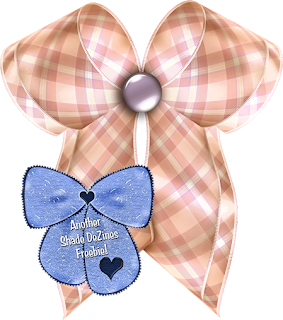
Puffy Bow Freebie!
I made this gorgeous bow using Pat's Preset provided to the DSC group ... thanks Pat!!
It is so pretty I had to share. I hope you like as much as I do!!
Enjoy.
RETIRED
Trying to get motivated!!
I am trying to work past the things going on. Some of you know what I am talking about. But, I have to stay busy, or go mad, lol.
I did work on my blog today. Gave it a totally new face lift, using the same header but fixed, lol. I owe this to InkkFreak who so kindly gave of her time to walk me through this thing I call 'hateful html' LOL!!! I want to work on something better ... I like this, but, I am capable of so much better. So that will be a project for the future and hopefully by then I will have looked over the things she helped me with and actually understand it *smiles*.
Hopefully, tomorrow, I will have some goodies up for you. I have a couple things to share, just haven't gotten to it yet. So check back soon!!
Nite!
Aug 27, 2008
Rick Rack (PSP)
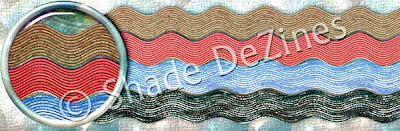
Okay ... Here's what it looks like.
1. Open a New Image 3600 x 350 / 300 ppi / Transparent
2. With your Selection Tool draw out a rectangle aprox. 55 pixels wide and the length of the canvas.
2. With your Selection Tool draw out a rectangle aprox. 55 pixels wide and the length of the canvas.
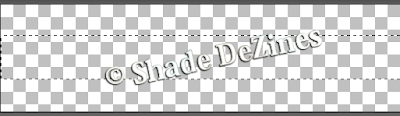
3. Flood Fill with a pattern or gradient of your choice.
* Make note of a darker complementing color in your pattern for using later. Copy it's HTML code or write it down.
4. Apply a texture of your choice or, use mine: Effects > Texture Effects > Texture/Canvas Coarse: Size (in order): 203, 0, 1, 0, o, 315, 50, 30.
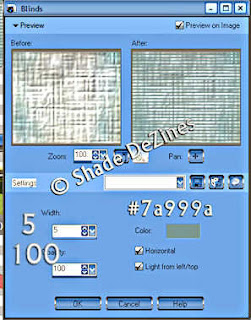
5. Effects > Texture Effects > Blinds.
* Make note of a darker complementing color in your pattern for using later. Copy it's HTML code or write it down.
4. Apply a texture of your choice or, use mine: Effects > Texture Effects > Texture/Canvas Coarse: Size (in order): 203, 0, 1, 0, o, 315, 50, 30.
5. Effects > Texture Effects > Blinds.
This is where you add the HTML # you saved.
Mine was for a green ribbon, sorry it doesn't match lol.
6. Select None.
7. Effects > Distortion Effects > Wave.
7. Effects > Distortion Effects > Wave.
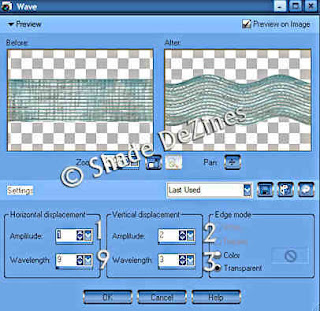
8. Using your selection marquee set to rectangle surround the rough ends and hit Delete.
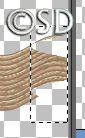
Or, use the the freehand selection tool if you want a diagonal cut.
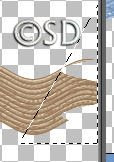
Save as .PNG for use in your layouts.
This is not to be made into a script. It is not to be sold. It is for your PERSONAL USE only.
Subscribe to:
Posts (Atom)